

The Analysis page has two tools. The Scout looks at today’s market and measures the price cards really sell at. The Forecast does not look at today’s market: it reads the hourly price history of every card and looks for rebounds, daily cycles and rises. Both end up as ready-made Trader filters.
Scout · setting up the scan
- 1In the side menu press Analysis. Set the budget, quality and risk profile (cautious, normal, aggressive: it decides the required margin and the speed preset of the proposals).
- 2Pick the depth: Quick (10 cards, 2 minutes between readings), Thorough (16 and 4), Complete (24 and 6).
- 3Start: the cards to measure come from the price file, within the budget and spread over six price bands, with priority to the 83–89 gold cards that move most.
Scout · reading the table
- Sells at: the lowest buy-now right now, never above the reference + 5%; with ✔ and the number of real sales (auctions gone before expiry between the two readings).
- Sold / per hour: the pace of the market for that card.
- Snipe ≤ and Bid ≤: the maximum prices; ● marks auctions without bids under that price. A threshold holds only if auctions really appeared under that figure (otherwise “threshold not found”).
- Net and gain per hour = net per card × realistic flips per hour.
- Verdict: on sale under the flip price (⚡ snipe), bids possible (🔨), to follow (👁 a filter the Trader keeps on until someone lists under that price). Discarded: little supply, market far above the reference, flip impossible under the EA minimum, over budget.
- Previous scan: the lowest seen in the previous scan and, with scans at different hours, the hour range in which it was cheapest (🕒 “better around 23:00”).
Scout · from the result to the Trader
- ✎ on a row opens in the Trader a fixed-price filter with those numbers (buy ≤ threshold, resell at the price it really sells at).
- Save all flips creates one snipe filter per valid flip; Start all flips launches them together with the profile’s preset.
- Filters created by the Analysis carry the “never above the reference” guard: if at purchase time the reference has dropped, the maximum drops with it; if no margin is left the filter does not buy until the market changes.
Forecast · the three signals
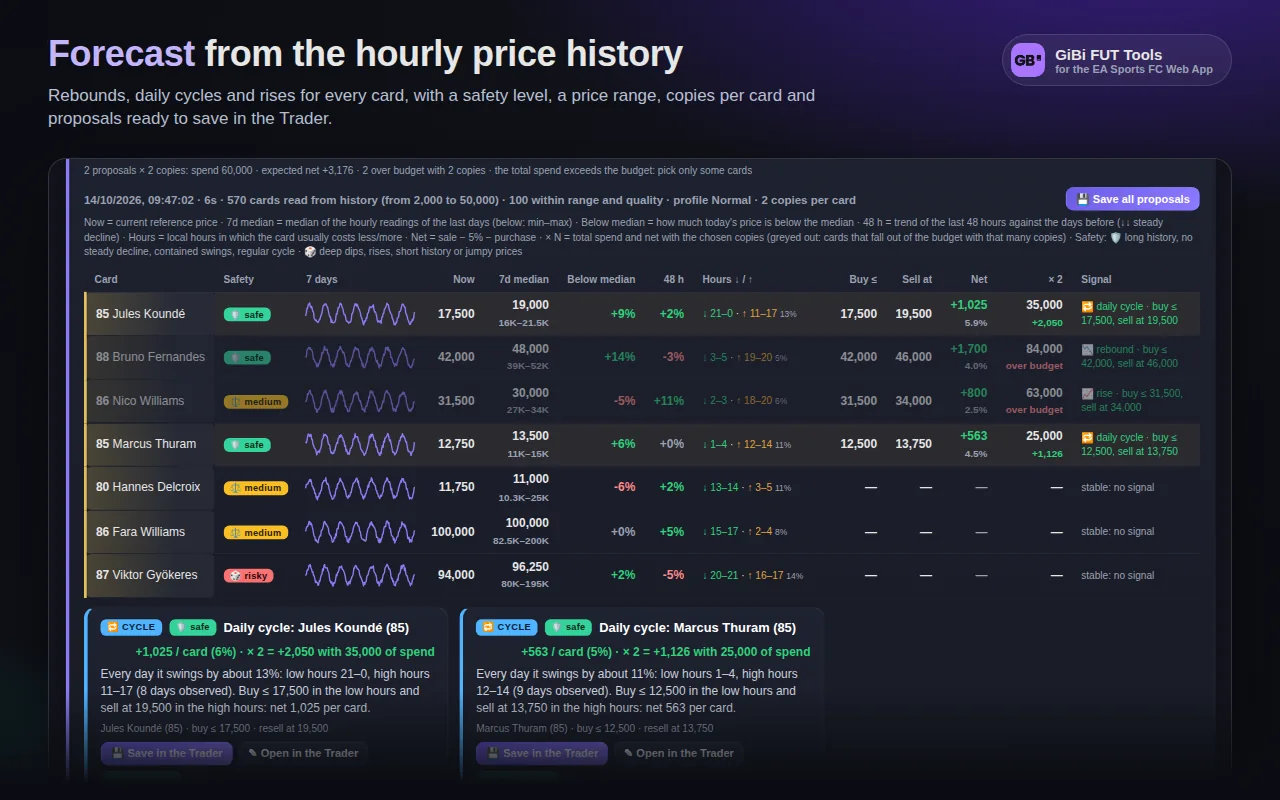
Press 🔮 Forecast the market. It uses the Scout’s budget, quality and profile and takes seconds: no search runs on the EA market.
- 📉 Rebound: the card sits under its 7-day median for a momentary dip (not a steady decline). Expected resale = partial return towards the median.
- 🔁 Daily cycle: recurring low and high hours, with a swing that covers the margin. Buy in the low hours, sell in the high ones (local hours in the table).
- 📈 Rise: the median of the last 48 hours above the days before and the price still high.
Forecast · controls and safety
- Price from … to …: the range of cards to consider (empty = from 4% of the budget up to the budget).
- Copies per card (1–50): the table adds total spend and net; filters receive Copies to buy = N.
- Show: all, 🛡️ safe only (≥ 60), ⚖️ medium, 🎲 risky (< 35). Safety comes from the length of the history, no steady decline, contained swings and the regularity of the cycle.
- Fixed rules: never buy above the current price and never sell above the 7-day maximum. With less than two days of history the results are indicative.